The Idea
Every developer has that one GitHub profile widget they wish existed. For me it was something that felt alive — not a static badge, not a bar chart, not even the classic snake. Something that actually used your contribution data as game state.
git-invader is exactly that. It reads your last 52 weeks of contributions via the GitHub GraphQL API, maps every active day to a Space Invaders alien, and generates a looping SVG animation where a ship hunts them all down — column by column, lowest row first — in a battle that is completely unique to your commit history.
Here’s mine running live:
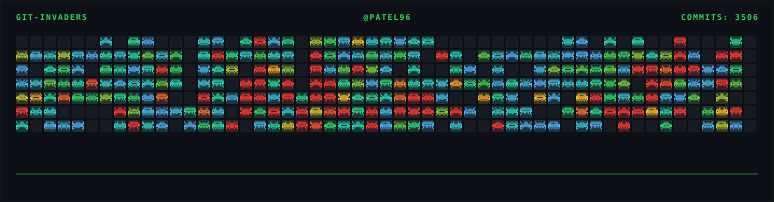
That animation is a single .svg file. No JavaScript. No runtime. No external requests. It embeds in a GitHub README the same way an image does.
Why This Is Harder Than It Looks
GitHub renders SVGs embedded via <img> tags in a sandboxed context. <script> tags are stripped entirely. So you cannot write:
// This dies on GitHub. <script> is stripped from <img>-rendered SVGs.
alien.addEventListener("hit", () => alien.remove());
Everything — movement, shooting, HP drain, kill flashes, the ship tracking its target — has to be pure CSS @keyframes. No DOM manipulation. No state. Every frame of every animation pre-computed at generation time and baked into the SVG as keyframe percentages.
That constraint is what makes git-invader genuinely impressive engineering. The SVG generator (src/games/space-invaders.ts) runs a full simulation of the entire battle upfront, records every event with its precise timestamp, then serializes all of it into CSS keyframes that play back the exact same sequence on loop, forever.
The Data Layer
Fetching Contributions
The GitHub GraphQL API gives you 52 weeks of contribution calendar data in one query:
// src/api/github.ts
const query = `
  query($username: String!) {
    user(login: $username) {
      contributionsCollection {
        contributionCalendar {
          totalContributions
          weeks {
            contributionDays {
              contributionCount
              date
              color
            }
          }
        }
      }
    }
  }
`;
Each day comes back with a contributionCount (raw number), date (YYYY-MM-DD), and color (GitHub’s hex color string for that cell). The color is mapped to a contribution level 0–4 using GitHub’s own palette:
const COLOR_TO_LEVEL: Record<string, 0 | 1 | 2 | 3 | 4> = {
	"#ebedf0": 0,
	"#9be9a8": 1,
	"#40c463": 2,
	"#30a14e": 3,
	"#216e39": 4, // light
	"#161b22": 0,
	"#0e4429": 1,
	"#006d32": 2,
	"#26a641": 3,
	"#39d353": 4, // dark
};
Each day becomes a Cell:
// src/types.ts
export type Cell = {
	x: number; // column index (week), 0 = oldest
	y: number; // row index (day of week), 0 = Sunday
	level: 0 | 1 | 2 | 3 | 4;
	count: number; // raw commit count
	date: string; // "YYYY-MM-DD"
	color: string; // github hex color
};
53 weeks × 7 days = up to 371 cells. That’s your army.
Mapping Commits to Aliens
The level determines the alien shape. The raw commit count determines alien HP — how many shots it takes to kill:
function getHealth(count: number): number {
	if (count === 0) return 0;
	if (count > 15) {
		const h = count % 15;
		return h === 0 ? 15 : h;
	}
	if (count > 10) {
		const h = count % 10;
		return h === 0 ? 10 : h;
	}
	return count;
}
So a day with 3 commits takes 3 shots. A day with 12 commits takes 2 shots (12 % 10). A day with 20 commits takes 5 shots (20 % 15). High-volume days aren’t just a different color — they’re actually harder to kill. The contribution graph becomes a difficulty map.
The Alien Bitmaps
Each alien shape is stored as an 11-column × 8-row bitmap — a number[] where each entry is an 11-bit integer, MSB = left column:
const BITMAP: Record<number, number[]> = {
	// Squid — narrow body, twin antennae
	1: [
		0b00100000100, // . . X . . . . . X . .
		0b00010001000, // . . . X . . . X . . .
		0b01111111110, // . X X X X X X X X X .
		0b11011111011, // X X . X X X X X . X X
		0b11111111111, // X X X X X X X X X X X
		0b01010101010, // . X . X . X . X . X .
		0b10001010001, // X . . . X . X . . . X
		0b00000000000,
	],
	// Crab — wide claws, splayed legs
	2: [
		/* ... */
	],
	// Octopus — round dome, dangling legs
	3: [
		/* ... */
	],
	// Spider — 4-point spike crown, spread legs
	4: [
		/* ... */
	],
};
At render time, each bitmap is converted into SVG <rect> elements and packed into a <symbol> in the <defs> block. Every alien on the grid is then a <use href="#a{level}"> — one symbol definition, hundreds of references. The SVG stays lean even for a fully packed contribution graph.
The same bitmap encoding applies to the four ship variants: rocket, saucer, delta, cruiser. The ship is chosen deterministically via totalCount % 4 — so your ship is always the same one, and it’s yours without any config required.
The Simulation Engine
This is the core of git-invader. Before a single SVG element is written, the generator runs a complete simulation of the entire battle.
Target Selection
At each step, the sim picks the best target using real Space Invaders targeting logic — lowest row first (closest to the ship), with lowest HP as a tiebreaker:
const getTarget = (): Alien | null => {
	let best: Alien | null = null;
	for (const stack of columnStack.values()) {
		if (stack.length === 0) continue;
		const front = stack[0];
		if (
			!best ||
			front.row > best.row || // closer to ship wins
			(front.row === best.row && front.hp < best.hp) // tie: lowest HP first
		)
			best = front;
	}
	return best;
};
Aliens in each column are stacked bottom-first. The ship can’t fire through a living alien — it clears the front of each column before exposing the one behind it.
Shot Scheduling
Every shot is pre-computed with exact timestamps: when it fires, when it hits, whether it kills:
type Shot = {
	id: string;
	shipX: number; // x position of ship when fired
	targetCY: number; // y center of the target alien
	fireAt: number; // time (seconds) when bullet leaves the barrel
	hitAt: number; // fireAt + TRAVEL (0.35s)
	isKill: boolean;
};
The timing constants are tuned by hand:
const MARCH = 2.0; // alien march phase before shooting starts
const TRAVEL = 0.35; // bullet travel time (seconds)
const FLASH = 0.08; // kill-flash duration
const COL_GAP = 0.12; // pause between shots
The simulation loops until columnStack is empty — every alien dead. The total animation duration TOTAL is the exact time of the last shot plus a 1.5-second hold before the loop restarts. No hardcoded duration. No padding. The animation is exactly as long as it needs to be.
Ship Positioning
The ship’s position is tracked as a list of (x, time) snapshots. Between shots it snaps to the next target column — instant, like the original game:
shipSnaps.push({ x: shipX, t: fireAt }); // ship arrives, holds
shipSnaps.push({ x: shipX, t: hitAt }); // ship waits for bullet to land
shipSnaps.push({ x: nextX, t: hitAt + 0.001 }); // instant snap to next target
These snapshots are serialized into a single @keyframes shipm rule with transform: translate(x, y) at each percentage. The sub-millisecond 0.001s gap creates an instantaneous jump that CSS treats as a cut — exactly what you want.
Baking It All Into CSS
Once the simulation finishes, every event gets converted into @keyframes rules with percentage timestamps:
const pct = (v: number) =>
	((Math.min(v, TOTAL) / TOTAL) * 100).toFixed(5) + "%";
Alien Opacity Keyframes
Each alien starts at full opacity. Every hit steps it down by 1 / maxHp. The kill shot snaps it to 0:
// For each non-kill hit at time ht:
`${pct(ht)}{opacity:${(opAfter * 0.3).toFixed(2)}}` // brief flash-dim
`${pct(ht + FLASH)}{opacity:${opAfter.toFixed(2)}}` // settle at lower base
// Kill frame:
`${pct(ka - FLASH)}{opacity:${(opBeforeKill * 0.3).toFixed(2)}}``${pct(ka)}{opacity:0}``100%{opacity:0}`; // stays dead until loop restarts
A 3-HP alien hit three times shows three distinct dimming steps before dying. You can actually see it taking damage.
Bullet Keyframes
Bullets park below the viewport when idle. At fireAt they snap to the barrel and turn visible, then translate upward to the target over TRAVEL seconds:
`0%,${pWait}{transform:translateY(0);opacity:0}` // parked, invisible
`${pFire}{transform:translateY(0);opacity:1}` // appear at barrel
`${pHit}{transform:translateY(${dyToTarget}px);opacity:1}` // travel to alien
`${pDone},100%{transform:translateY(${dyToTarget}px);opacity:0}`; // hit, gone
The dyToTarget is negative (upward) because SVG Y increases downward. Each bullet has its own unique keyframe animation — bm${id} — so all shots animate independently on the same TOTAL timeline.
The multi Color Mode
In multi mode, alien color isn’t a flat accent — it’s interpolated across a 5-stop gradient based on raw commit count, soft-capped at 20:
function commitCountColor(count: number, mode: ThemeMode): string {
	const t = Math.min(count / 20, 1);
	const darkStops = [
		[0x58, 0xa6, 0xff], // blue   (1-2 commits)
		[0x26, 0xd9, 0xb8], // cyan
		[0x39, 0xd3, 0x53], // green
		[0xfb, 0xbf, 0x24], // yellow
		[0xff, 0x3b, 0x30], // red    (20+ commits)
	];
	// linear interpolation between stops...
}
Low-activity days are blue. High-activity days glow red. The gradient makes the shape of your work year visible at a glance — you can see sprints, crunch periods, and quiet weeks all in the color of the aliens before the ship even fires.
Setting It Up
Three steps. Takes about 10 minutes.
1. Add the workflow to your profile repo
Your profile repo is github.com/USERNAME/USERNAME. Create .github/workflows/git-invader.yml:
name: git-invaders

on:
    schedule:
        - cron: "0 */12 * * *" # refresh every 12 hours
    workflow_dispatch: # manual trigger
    push:
        branches: [main, master]

jobs:
    generate:
        runs-on: ubuntu-latest
        permissions:
            contents: write

        steps:
            - uses: actions/checkout@v4

            - name: Generate SVG
              uses: VARDHAMANPATEL23/git-invader@v1.0.0
              with:
                  github_token: ${{ secrets.GITHUB_TOKEN }}
                  github_username: ${{ github.repository_owner }}
                  color: multi # green | blue | orange | pink | yellow | multi
                  mode: dark # dark | light | (blank = both)
                  ship: rocket # rocket | saucer | delta | cruiser | (blank = auto)

            - name: Push to output branch
              uses: crazy-max/ghaction-github-pages@v4
              with:
                  target_branch: output
                  build_dir: dist
                  keep_history: true
              env:
                  GITHUB_TOKEN: ${{ secrets.GITHUB_TOKEN }}
Leave color or mode blank to generate all variants in one run. Leave ship blank and the action picks one deterministically from your total commit count — same ship every time, zero config required.
2. Run it
Go to your profile repo → Actions → git-invaders → Run workflow.
After it finishes, the SVGs land in the output branch of your profile repo.
3. Embed in your README
Single image (simplest):

Auto dark/light switch (recommended):
<picture>
	<source
		media="(prefers-color-scheme: dark)"
		srcset="
			https://raw.githubusercontent.com/USERNAME/USERNAME/output/git-invader-multi-dark.svg
		"
	/>
	<source
		media="(prefers-color-scheme: light)"
		srcset="
			https://raw.githubusercontent.com/USERNAME/USERNAME/output/git-invader-multi-light.svg
		"
	/>
	<img
		alt="git-invaders"
		src="https://raw.githubusercontent.com/USERNAME/USERNAME/output/git-invader-multi-dark.svg"
	/>
</picture>
The URL pattern for any variant:
https://raw.githubusercontent.com/USERNAME/USERNAME/output/git-invader-{color}-{mode}.svg
Action Inputs
| Input | Required | Default | Description |
|---|---|---|---|
github_token | yes | — | ${{ secrets.GITHUB_TOKEN }} is sufficient |
github_username | yes | — | Username whose contributions to render |
color | no | (all 6) | green blue orange pink yellow multi |
mode | no | (both) | dark light |
ship | no | (auto) | rocket saucer delta cruiser |
output_dir | no | dist | Directory to write SVG files into |
Running Locally
With mock data (no token needed, generates all 12 variants):
git clone https://github.com/VARDHAMANPATEL23/git-invader
cd git-invader
bun install
bun src/test-mock.ts
# writes all 12 SVGs (6 colors × 2 modes) to dist/
With your real GitHub data:
bun src/index.ts --token YOUR_GITHUB_PAT --username YOUR_USERNAME
CLI flags:
| Flag | Description |
|---|---|
--token | GitHub personal access token |
--username | Target GitHub username |
--color | green blue orange pink yellow multi |
--mode | dark light |
--ship | rocket saucer delta cruiser |
--out | Output directory (default: dist) |
What Makes It Actually Good
Most profile README projects are wrappers around a charting library with a cron job bolted on. git-invader is not that.
The engineering decisions compound in interesting ways:
Bitmaps as integers. Each alien row is an 11-bit number. Tight, readable, and trivial to iterate with a single bitshift loop. No external pixel editor, no asset pipeline.
Simulation first, render second. The generator never touches SVG until it knows exactly what happens and when. That clean separation means the animation logic is testable in isolation —
test-mock.tsruns it against generated fake data without any GitHub token.CSS as a tape machine. The keyframe system is essentially a pre-recorded playback — every event at a fixed offset on a fixed-duration timeline, looping infinitely. It’s a clever constraint inversion: instead of fighting GitHub’s
<script>ban, the architecture treats it as the spec.Self-contained by default. No CDN requests, no web fonts loaded at runtime. The pixel font is base64-inlined. Drop the raw URL into any Markdown renderer, any HTML page, any email client that renders SVGs — it works.
Bottom Line
git-invader took a genuinely hard constraint — animate a game with no JavaScript, in a format GitHub will render, using only your commit data — and solved it cleanly. The output is something people actually stop and look at on a profile page, which is the whole point.
If you want your GitHub profile to show something you built rather than something you installed, this is worth ten minutes.
Links:
- Repo: github.com/VARDHAMANPATEL23/git-invader
- Workflow template:
examples/git-invader.yml